Production Capacity Planning
Convert demand to machine hours including setup time and scrap. Calculate remaining capacity shortfalls after overtime.
Macro-free .xlsx · 16 sample records · Workbook labels in Turkish
Results from the sample workbook
- Başlatılacak adet
- 1,250
- Yük (saat)
- 18.33
- Normal doluluk
- 130.95%
Who can use it, and for what?
Production planners and shift supervisors
See which line exceeds normal hours and how much extra time can cover.
Workshops and contract manufacturers
Estimate total processing and setup time, allowing for scrap, before accepting an order.
A worked example from the workbook
Line 1 must start 1,250 units to finish 1,200 good units. The load is 18.33 hours. Even with three extra hours, 1.33 hours remain uncovered. Use the gap when discussing a line transfer or a revised due date.
| Measure | Sample result |
|---|---|
| Başlatılacak adet | 1,250 |
| Yük (saat) | 18.33 |
| Normal doluluk | 130.95% |
| Gerekli ek saat | 3 |
| Kalan açık (saat) | 1.33 |
| Ek saat maliyeti | 1,260 |
How do you start with your own data?
- Keep lot size, setup time and cycle time separate. Enter demand as good units, scrap as a percentage, and normal and overtime capacity for the same horizon.
- Make a copy of the sample workbook. Review the settings on Panel and replace the blue inputs on Veri with your own data.
- Compare dashboard totals with the row-level results on Veri. The written guide below shows how to test a change.
Detailed Excel guide
Initial setup
Keep lot size, setup time and cycle time separate. Enter demand as good units, scrap as a percentage, and normal and overtime capacity for the same horizon.
- Open a copy and try the sample data first. Panel contains settings and totals. Veri contains editable inputs and formulas. Workbook field labels are in Turkish and appear as written in the file.
- Compare the settings and the first data row below with the workbook. Blue cells are inputs. Preserve the working formulas.
- The workbook has 16 populated examples and 98 prepared formula rows. Keep the headers and replace the input values with your own records.
Panel settings
| Cell | Field | Sample value |
|---|---|---|
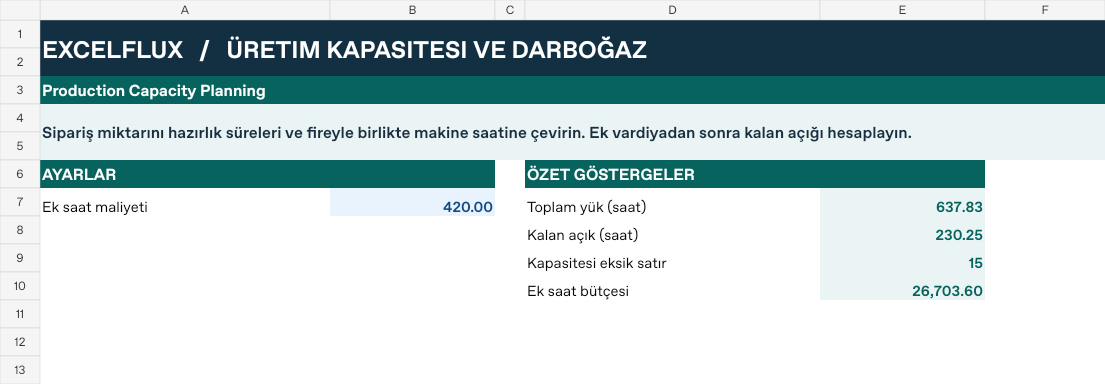
Panel!B7 | Ek saat maliyeti | 420 |
First data row
| Cell | Field | Sample value |
|---|---|---|
Veri!A7 | Hat ve ürün | Hat 1 / 301 |
Veri!B7 | İyi adet hedefi | 1,200 |
Veri!C7 | Çevrim (sn) | 48 |
Veri!D7 | Parti adedi | 300 |
Veri!E7 | Hazırlık (dk) | 20 |
Veri!F7 | Normal saat | 14 |
Veri!G7 | Ek saat limiti | 3 |
Veri!H7 | Fire | 4% |
Calculated results and formulas
These values are calculated from the supplied workbook examples.
Formulas below use English Excel syntax. Function names and separators can vary with your Excel locale.
| Cell | Field | Sample value |
|---|---|---|
Veri!I7 | Başlatılacak adetCell formula=IF(A7="","",IF(H7<1,ROUNDUP(B7/(1-H7),0),0)) | 1,250 |
Veri!J7 | Yük (saat)Cell formula=IF(A7="","",I7*C7/3600+ROUNDUP(I7/MAX(1,D7),0)*E7/60) | 18.33 |
Veri!K7 | Normal dolulukCell formula=IF(A7="","",IF(F7>0,J7/F7,0)) | 130.95% |
Veri!L7 | Gerekli ek saatCell formula=IF(A7="","",MIN(G7,MAX(0,J7-F7))) | 3 |
Veri!M7 | Kalan açık (saat)Cell formula=IF(A7="","",MAX(0,J7-F7-L7)) | 1.33 |
Veri!N7 | Ek saat maliyetiCell formula=IF(A7="","",L7*Panel!$B$7) | 1,260 |
Dashboard indicators
These values are calculated from the supplied workbook examples.
| Cell | Field | Sample value |
|---|---|---|
Panel!E7 | Toplam yük (saat) | 637.83 |
Panel!E8 | Kalan açık (saat) | 230.25 |
Panel!E9 | Kapasitesi eksik satır | 15 |
Panel!E10 | Ek saat bütçesi | 26,703.6 |
Change one input and check the result
- Open the Veri sheet in the sample workbook.
G7→ enter 6.M7expected value 0.- Review the affected dashboard metrics. Restore the test input or save the example as a separate copy before using your own data.
Interpretation and troubleshooting
Uncovered hours remain after overtime. A zero gap can still carry overtime cost. Do not count available machine capacity multiple times when orders share a line.
If the result does not change, confirm the input cell and sheet and check that automatic calculation is enabled. To reproduce the example, leave the remaining inputs at their starting values.