Inventory and Reorder Planning
Combine weekly demand, lead time and committed stock to calculate when and how much to order. Pack size and minimum order quantity are both applied.
Macro-free .xlsx · 18 sample records · Workbook labels in Turkish
Results from the sample workbook
- Kullanılabilir
- 60
- Sipariş noktası
- 140
- Hedef stok
- 220
Who can use it, and for what?
Warehouse and purchasing teams
Deduct stock already committed to orders before deciding which items to replenish.
Retail and distribution
Account for goods already in transit when balancing stockouts against excess inventory.
A worked example from the workbook
ST-101 has 60 units available against a reorder point of 140. Pack and order rules give a recommendation of 168 units. Purchasing can use the resulting 9,744 estimate to plan the order.
| Measure | Sample result |
|---|---|
| Kullanılabilir | 60 |
| Sipariş noktası | 140 |
| Hedef stok | 220 |
| Önerilen adet | 168 |
| Sipariş bütçesi | 9,744 |
How do you start with your own data?
- Use one row per SKU and one unit of measure for on-hand, incoming and reserved stock. Record demand and lead time on a weekly basis. Remove received units from incoming stock before updating on-hand.
- Make a copy of the sample workbook. Review the settings on Panel and replace the blue inputs on Veri with your own data.
- Compare dashboard totals with the row-level results on Veri. The written guide below shows how to test a change.
Detailed Excel guide
Initial setup
Use one row per SKU and one unit of measure for on-hand, incoming and reserved stock. Record demand and lead time on a weekly basis. Remove received units from incoming stock before updating on-hand.
- Open a copy and try the sample data first. Panel contains settings and totals. Veri contains editable inputs and formulas. Workbook field labels are in Turkish and appear as written in the file.
- Compare the settings and the first data row below with the workbook. Blue cells are inputs. Preserve the working formulas.
- The workbook has 18 populated examples and 98 prepared formula rows. Keep the headers and replace the input values with your own records.
Panel settings
| Cell | Field | Sample value |
|---|---|---|
Panel!B7 | Emniyet stoğu (hafta) | 1.5 |
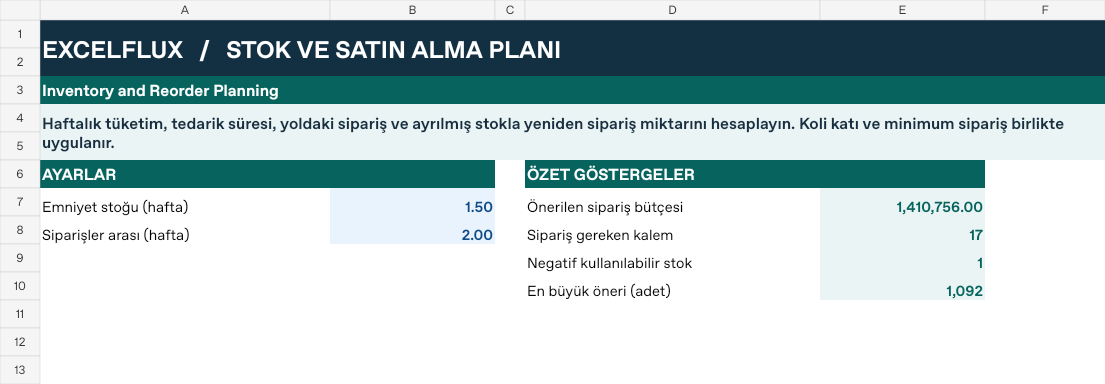
Panel!B8 | Siparişler arası (hafta) | 2 |
First data row
| Cell | Field | Sample value |
|---|---|---|
Veri!A7 | Stok kodu | ST-101 |
Veri!B7 | Haftalık talep | 40 |
Veri!C7 | Tedarik (hafta) | 2 |
Veri!D7 | Eldeki | 80 |
Veri!E7 | Yolda | 0 |
Veri!F7 | Ayrılmış | 20 |
Veri!G7 | Koli adedi | 12 |
Veri!H7 | Min. sipariş | 48 |
Veri!I7 | Birim maliyet | 58 |
Calculated results and formulas
These values are calculated from the supplied workbook examples.
Formulas below use English Excel syntax. Function names and separators can vary with your Excel locale.
| Cell | Field | Sample value |
|---|---|---|
Veri!J7 | KullanılabilirCell formula=IF(A7="","",D7+E7-F7) | 60 |
Veri!K7 | Sipariş noktasıCell formula=IF(A7="","",ROUNDUP(B7*(C7+Panel!$B$7),0)) | 140 |
Veri!L7 | Hedef stokCell formula=IF(A7="","",ROUNDUP(B7*(C7+Panel!$B$7+Panel!$B$8),0)) | 220 |
Veri!M7 | Önerilen adetCell formula=IF(A7="","",IF(J7>K7,0,ROUNDUP(MAX(H7,L7-J7)/MAX(1,G7),0)*MAX(1,G7))) | 168 |
Veri!N7 | Sipariş bütçesiCell formula=IF(A7="","",M7*I7) | 9,744 |
Dashboard indicators
These values are calculated from the supplied workbook examples.
| Cell | Field | Sample value |
|---|---|---|
Panel!E7 | Önerilen sipariş bütçesi | 1,410,756 |
Panel!E8 | Sipariş gereken kalem | 17 |
Panel!E9 | Negatif kullanılabilir stok | 1 |
Panel!E10 | En büyük öneri (adet) | 1,092 |
Change one input and check the result
- Open the Veri sheet in the sample workbook.
D7→ enter 180.M7expected value 0.- Review the affected dashboard metrics. Restore the test input or save the example as a separate copy before using your own data.
Interpretation and troubleshooting
Compare inventory position with the reorder point. Pack multiples and minimum quantities can raise the order above the raw shortage. Review zero proposals against the position and reorder threshold.
If the result does not change, confirm the input cell and sheet and check that automatic calculation is enabled. To reproduce the example, leave the remaining inputs at their starting values.