Order Fulfillment and Delivery
Track partial shipments against promised dates. Measure on-time-in-full delivery and outstanding overdue units.
Macro-free .xlsx · 20 sample records · Workbook labels in Turkish
Results from the sample workbook
- Açık adet
- 45
- Gecikme günü
- 17
- OTIF başarısı
- 0
Who can use it, and for what?
Order management and distribution
Sort orders still open after a partial shipment by the promised date.
Customer service and sales
Use overdue quantity and order value to prioritise customer updates.
A worked example from the workbook
SO-301 has shipped 75 of 120 units. The remaining 45 units are 17 days late and worth 27,900. The partial shipment does not meet the on-time, in-full (OTIF) measure.
| Measure | Sample result |
|---|---|
| Açık adet | 45 |
| Gecikme günü | 17 |
| OTIF başarısı | 0 |
| Ölçüme dahil | 1 |
| Geciken açık tutar | 27,900 |
How do you start with your own data?
- Track order quantity, promised delivery and shipment against one ID. Update delivered quantity and actual delivery date together. Choose the as-of date on Panel.
- Make a copy of the sample workbook. Review the settings on Panel and replace the blue inputs on Veri with your own data.
- Compare dashboard totals with the row-level results on Veri. The written guide below shows how to test a change.
Detailed Excel guide
Initial setup
Track order quantity, promised delivery and shipment against one ID. Update delivered quantity and actual delivery date together. Choose the as-of date on Panel.
- Open a copy and try the sample data first. Panel contains settings and totals. Veri contains editable inputs and formulas. Workbook field labels are in Turkish and appear as written in the file.
- Compare the settings and the first data row below with the workbook. Blue cells are inputs. Preserve the working formulas.
- The workbook has 20 populated examples and 98 prepared formula rows. Keep the headers and replace the input values with your own records.
Panel settings
| Cell | Field | Sample value |
|---|---|---|
Panel!B7 | Rapor tarihi | 2026-11-01 |
First data row
| Cell | Field | Sample value |
|---|---|---|
Veri!A7 | Sipariş | SO-301 |
Veri!B7 | Müşteri | Ada |
Veri!C7 | Sipariş adedi | 120 |
Veri!D7 | Sevk adedi | 75 |
Veri!E7 | Söz tarihi | 2026-10-15 |
Veri!F7 | Son sevk tarihi | 2026-10-18 |
Veri!G7 | Birim satış | 620 |
Calculated results and formulas
These values are calculated from the supplied workbook examples.
Formulas below use English Excel syntax. Function names and separators can vary with your Excel locale.
| Cell | Field | Sample value |
|---|---|---|
Veri!H7 | Açık adetCell formula=IF(A7="","",MAX(0,C7-D7)) | 45 |
Veri!I7 | Gecikme günüCell formula=IF(A7="","",IF(H7>0,MAX(0,Panel!$B$7-E7),IF(F7>0,MAX(0,F7-E7),0))) | 17 |
Veri!J7 | OTIF başarısıCell formula=IF(A7="","",IF(AND(C7>0,D7>=C7,F7>0,F7<=E7),1,0)) | 0 |
Veri!K7 | Ölçüme dahilCell formula=IF(A7="","",IF(OR(AND(H7=0,F7>0),E7<=Panel!$B$7),1,0)) | 1 |
Veri!L7 | Geciken açık tutarCell formula=IF(A7="","",IF(I7>0,H7*G7,0)) | 27,900 |
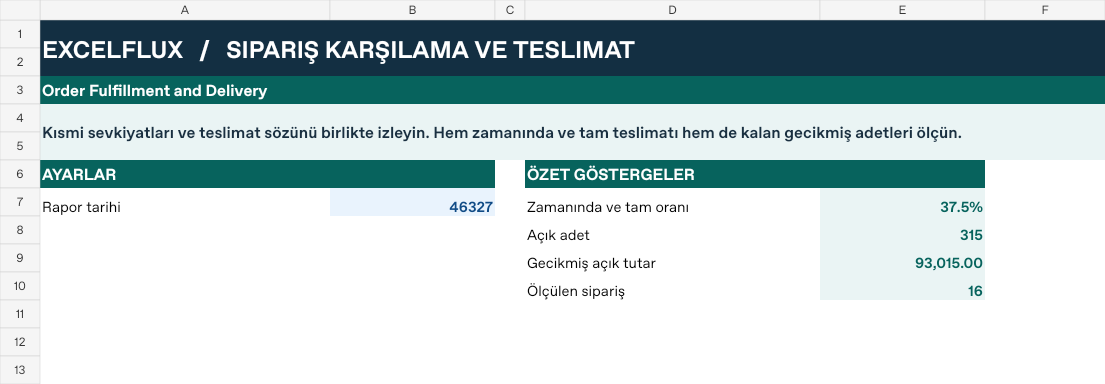
Dashboard indicators
These values are calculated from the supplied workbook examples.
| Cell | Field | Sample value |
|---|---|---|
Panel!E7 | Zamanında ve tam oranı | 37.5% |
Panel!E8 | Açık adet | 315 |
Panel!E9 | Gecikmiş açık tutar | 93,015 |
Panel!E10 | Ölçülen sipariş | 16 |
Change one input and check the result
- Open the Veri sheet in the sample workbook.
D7→ enter 120.I7expected value 3.- Review the affected dashboard metrics. Restore the test input or save the example as a separate copy before using your own data.
Interpretation and troubleshooting
A fully delivered order can still have been late. Read on-time-in-full performance separately from the current open-order count. Keep partial shipments distinct.
If the result does not change, confirm the input cell and sheet and check that automatic calculation is enabled. To reproduce the example, leave the remaining inputs at their starting values.