Project Earned Value Control
Compare planned and measured work-package completion. Use cost efficiency to forecast final project cost.
Macro-free .xlsx · 16 sample records · Workbook labels in Turkish
Results from the sample workbook
- Planlanan değer
- 80,000
- Kazanılan değer
- 56,000
- Maliyet farkı
- -16,000
Who can use it, and for what?
Project and construction managers
Review schedule slippage separately from cost variance and decide which package needs attention.
Cost controllers
Compare the budgeted value of completed work with actual spend to investigate cost efficiency.
A worked example from the workbook
WP-11 is 35% complete against a plan of 50%. Planned value is 80,000, earned value is 56,000 and actual cost is 72,000. The package is behind schedule and has spent 16,000 more than the budgeted value of work completed.
| Measure | Sample result |
|---|---|
| Planlanan değer | 80,000 |
| Kazanılan değer | 56,000 |
| Maliyet farkı | -16,000 |
| Takvim farkı (değer) | -24,000 |
| CPI | 0.78 |
| SPI | 0.7 |
| Uyarı | 1 |
How do you start with your own data?
- Enter baseline budget, planned and actual progress, and actual cost for the same cut-off date. Type percentages as percentages and corroborate progress with measured work.
- Make a copy of the sample workbook. Review the settings on Panel and replace the blue inputs on Veri with your own data.
- Compare dashboard totals with the row-level results on Veri. The written guide below shows how to test a change.
Detailed Excel guide
Initial setup
Enter baseline budget, planned and actual progress, and actual cost for the same cut-off date. Type percentages as percentages and corroborate progress with measured work.
- Open a copy and try the sample data first. Panel contains settings and totals. Veri contains editable inputs and formulas. Workbook field labels are in Turkish and appear as written in the file.
- Compare the settings and the first data row below with the workbook. Blue cells are inputs. Preserve the working formulas.
- The workbook has 16 populated examples and 98 prepared formula rows. Keep the headers and replace the input values with your own records.
Panel settings
| Cell | Field | Sample value |
|---|---|---|
Panel!B7 | CPI uyarı eşiği | 0.95 |
First data row
| Cell | Field | Sample value |
|---|---|---|
Veri!A7 | İş paketi | WP-11 |
Veri!B7 | Paket bütçesi | 160,000 |
Veri!C7 | Planlanan ilerleme | 50% |
Veri!D7 | Gerçek ilerleme | 35% |
Veri!E7 | Fiili maliyet | 72,000 |
Calculated results and formulas
These values are calculated from the supplied workbook examples.
Formulas below use English Excel syntax. Function names and separators can vary with your Excel locale.
| Cell | Field | Sample value |
|---|---|---|
Veri!F7 | Planlanan değerCell formula=IF(A7="","",B7*C7) | 80,000 |
Veri!G7 | Kazanılan değerCell formula=IF(A7="","",B7*D7) | 56,000 |
Veri!H7 | Maliyet farkıCell formula=IF(A7="","",G7-E7) | -16,000 |
Veri!I7 | Takvim farkı (değer)Cell formula=IF(A7="","",G7-F7) | -24,000 |
Veri!J7 | CPICell formula=IF(A7="","",IF(E7>0,G7/E7,"")) | 0.78 |
Veri!K7 | SPICell formula=IF(A7="","",IF(F7>0,G7/F7,"")) | 0.7 |
Veri!L7 | UyarıCell formula=IF(A7="","",IF(AND(E7>0,J7<Panel!$B$7),1,0)) | 1 |
Dashboard indicators
These values are calculated from the supplied workbook examples.
| Cell | Field | Sample value |
|---|---|---|
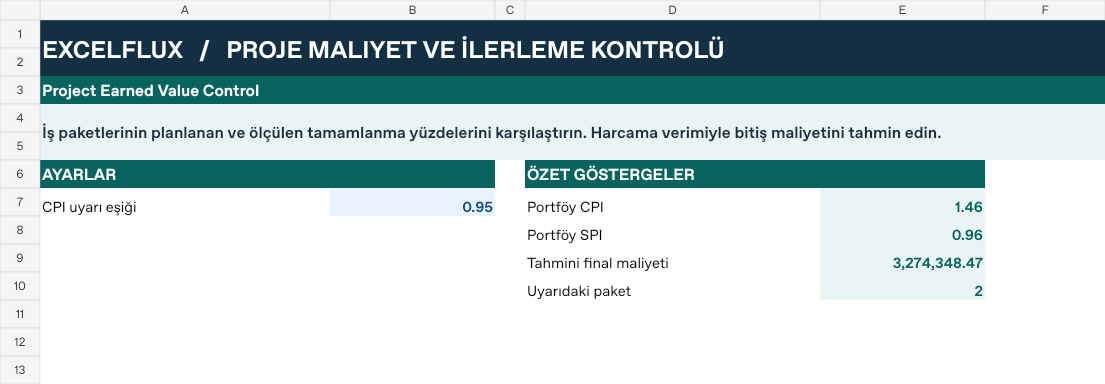
Panel!E7 | Portföy CPI | 1.46 |
Panel!E8 | Portföy SPI | 0.96 |
Panel!E9 | Tahmini final maliyeti | 3,274,348.47 |
Panel!E10 | Uyarıdaki paket | 2 |
Change one input and check the result
- Open the Veri sheet in the sample workbook.
D7→ enter 60%.H7expected value 24,000.- Review the affected dashboard metrics. Restore the test input or save the example as a separate copy before using your own data.
Interpretation and troubleshooting
Earned value converts progress to budgeted currency. Cost variance compares earned value with actual cost. A CPI below one indicates unfavorable cost performance. Review missing or zero actual cost before interpreting a ratio.
If the result does not change, confirm the input cell and sheet and check that automatic calculation is enabled. To reproduce the example, leave the remaining inputs at their starting values.