Shipping and Dimensional Weight
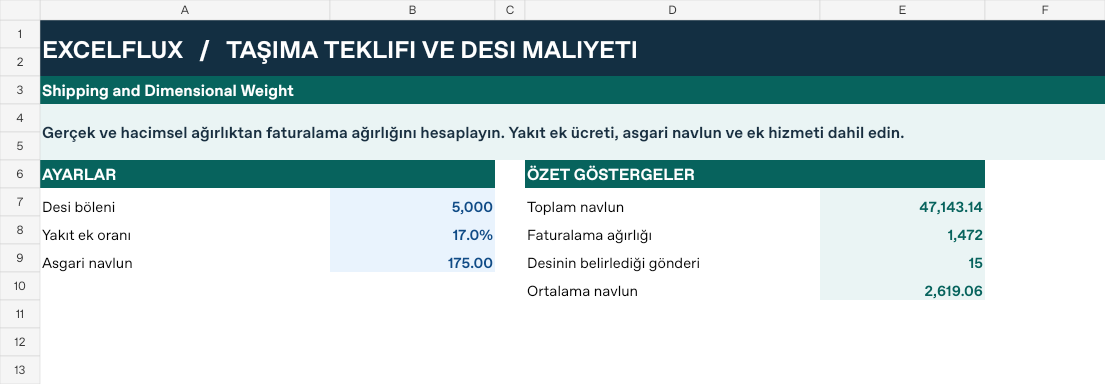
Calculate chargeable weight using actual and dimensional weight. Include the fuel surcharge, minimum freight and service fees.
Macro-free .xlsx · 18 sample records · Workbook labels in Turkish
Results from the sample workbook
- Hacimsel kg/paket
- 16.8
- Faturalama kg
- 34
- Baz navlun
- 748
Who can use it, and for what?
Parcel and shipping teams
See how parcel dimensions change billable weight for a shipment.
E-commerce and distribution
Assess packaging or carrier changes with freight, fuel and extra charges included.
A worked example from the workbook
KP-301 has 16.8 volumetric kilograms per parcel, with 34 kg billed and a total freight charge of 911.16. Test a different box using the same carrier rules to see whether it changes the charge.
| Measure | Sample result |
|---|---|
| Hacimsel kg/paket | 16.8 |
| Faturalama kg | 34 |
| Baz navlun | 748 |
| Yakıt ek tutarı | 127.16 |
| Toplam navlun | 911.16 |
| Desi belirleyici | 1 |
How do you start with your own data?
- Enter dimensions in centimeters and weight in kilograms. Use per-parcel dimensions and weight, with parcel count separate. Choose carrier-specific dimensional divisor, fuel charge and minimum.
- Make a copy of the sample workbook. Review the settings on Panel and replace the blue inputs on Veri with your own data.
- Compare dashboard totals with the row-level results on Veri. The written guide below shows how to test a change.
Detailed Excel guide
Initial setup
Enter dimensions in centimeters and weight in kilograms. Use per-parcel dimensions and weight, with parcel count separate. Choose carrier-specific dimensional divisor, fuel charge and minimum.
- Open a copy and try the sample data first. Panel contains settings and totals. Veri contains editable inputs and formulas. Workbook field labels are in Turkish and appear as written in the file.
- Compare the settings and the first data row below with the workbook. Blue cells are inputs. Preserve the working formulas.
- The workbook has 18 populated examples and 98 prepared formula rows. Keep the headers and replace the input values with your own records.
Panel settings
| Cell | Field | Sample value |
|---|---|---|
Panel!B7 | Desi böleni | 5,000 |
Panel!B8 | Yakıt ek oranı | 17% |
Panel!B9 | Asgari navlun | 175 |
First data row
| Cell | Field | Sample value |
|---|---|---|
Veri!A7 | Gönderi | KP-301 |
Veri!B7 | Boy (cm) | 60 |
Veri!C7 | En (cm) | 40 |
Veri!D7 | Yük. (cm) | 35 |
Veri!E7 | Gerçek kg | 11 |
Veri!F7 | Paket | 2 |
Veri!G7 | Kg fiyatı | 22 |
Veri!H7 | Ek hizmet | 36 |
Calculated results and formulas
These values are calculated from the supplied workbook examples.
Formulas below use English Excel syntax. Function names and separators can vary with your Excel locale.
| Cell | Field | Sample value |
|---|---|---|
Veri!I7 | Hacimsel kg/paketCell formula=IF(A7="","",IF(Panel!$B$7>0,B7*C7*D7/Panel!$B$7,0)) | 16.8 |
Veri!J7 | Faturalama kgCell formula=IF(A7="","",ROUNDUP(MAX(I7,E7),0)*F7) | 34 |
Veri!K7 | Baz navlunCell formula=IF(A7="","",MAX(Panel!$B$9,J7*G7)) | 748 |
Veri!L7 | Yakıt ek tutarıCell formula=IF(A7="","",K7*Panel!$B$8) | 127.16 |
Veri!M7 | Toplam navlunCell formula=IF(A7="","",SUM(K7:L7)+H7) | 911.16 |
Veri!N7 | Desi belirleyiciCell formula=IF(A7="","",IF(I7>E7,1,0)) | 1 |
Dashboard indicators
These values are calculated from the supplied workbook examples.
| Cell | Field | Sample value |
|---|---|---|
Panel!E7 | Toplam navlun | 47,143.14 |
Panel!E8 | Faturalama ağırlığı | 1,472 |
Panel!E9 | Desinin belirlediği gönderi | 15 |
Panel!E10 | Ortalama navlun | 2,619.06 |
Change one input and check the result
- Open the Veri sheet in the sample workbook.
E7→ enter 20.J7expected value 40.- Review the affected dashboard metrics. Restore the test input or save the example as a separate copy before using your own data.
Interpretation and troubleshooting
Billable weight follows the larger applicable actual or dimensional weight. Minimum charges can leave the fee unchanged even if weight changes. Check the carrier’s rounding rules.
If the result does not change, confirm the input cell and sheet and check that automatic calculation is enabled. To reproduce the example, leave the remaining inputs at their starting values.