Maintenance Planning and Downtime
Track calendar and meter-based intervals together. Prioritize due maintenance using the expected downtime cost.
Macro-free .xlsx · 18 sample records · Workbook labels in Turkish
Results from the sample workbook
- Sonraki bakım
- 2026-10-05
- Kalan gün
- -27
- Kalan sayaç saati
- 40
Who can use it, and for what?
Maintenance planners
Compare calendar and meter thresholds to separate upcoming maintenance from overdue work.
Fleet, facilities and production managers
Coordinate machine downtime with the production or service schedule.
A worked example from the workbook
EQ-101 has 40 meter hours remaining but its calendar service is already 27 days overdue. It is marked priority 2. Use its estimated 4,000 planned downtime cost when scheduling the stop.
| Measure | Sample result |
|---|---|
| Sonraki bakım | 2026-10-05 |
| Kalan gün | -27 |
| Kalan sayaç saati | 40 |
| Öncelik | 2 |
| Planlı duruş maliyeti | 4,000 |
How do you start with your own data?
- Use one asset ID and take the last-service date and meter from the same work order. Use consistent meter units and set calendar and meter warning thresholds.
- Make a copy of the sample workbook. Review the settings on Panel and replace the blue inputs on Veri with your own data.
- Compare dashboard totals with the row-level results on Veri. The written guide below shows how to test a change.
Detailed Excel guide
Initial setup
Use one asset ID and take the last-service date and meter from the same work order. Use consistent meter units and set calendar and meter warning thresholds.
- Open a copy and try the sample data first. Panel contains settings and totals. Veri contains editable inputs and formulas. Workbook field labels are in Turkish and appear as written in the file.
- Compare the settings and the first data row below with the workbook. Blue cells are inputs. Preserve the working formulas.
- The workbook has 18 populated examples and 98 prepared formula rows. Keep the headers and replace the input values with your own records.
Panel settings
| Cell | Field | Sample value |
|---|---|---|
Panel!B7 | Kontrol tarihi | 2026-11-01 |
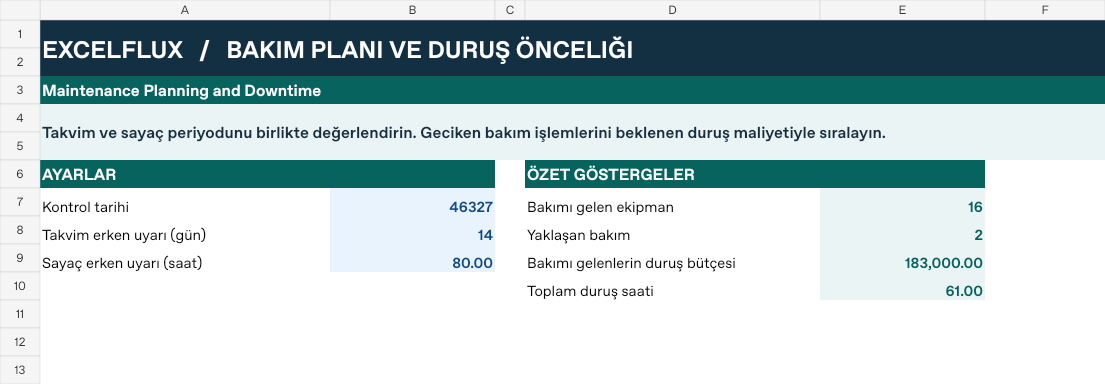
Panel!B8 | Takvim erken uyarı (gün) | 14 |
Panel!B9 | Sayaç erken uyarı (saat) | 80 |
First data row
| Cell | Field | Sample value |
|---|---|---|
Veri!A7 | Ekipman | EQ-101 |
Veri!B7 | Son bakım tarihi | 2026-08-06 |
Veri!C7 | Periyot (gün) | 60 |
Veri!D7 | Son bakım sayacı | 1,000 |
Veri!E7 | Güncel sayaç | 1,440 |
Veri!F7 | Sayaç periyodu | 480 |
Veri!G7 | Duruş (saat) | 2 |
Veri!H7 | Duruş bedeli/saat | 2,000 |
Calculated results and formulas
These values are calculated from the supplied workbook examples.
Formulas below use English Excel syntax. Function names and separators can vary with your Excel locale.
| Cell | Field | Sample value |
|---|---|---|
Veri!I7 | Sonraki bakımCell formula=IF(A7="","",B7+C7) | 2026-10-05 |
Veri!J7 | Kalan günCell formula=IF(A7="","",I7-Panel!$B$7) | -27 |
Veri!K7 | Kalan sayaç saatiCell formula=IF(A7="","",D7+F7-E7) | 40 |
Veri!L7 | ÖncelikCell formula=IF(A7="","",IF(OR(J7<=0,K7<=0),2,IF(OR(J7<=Panel!$B$8,K7<=Panel!$B$9),1,0))) | 2 |
Veri!M7 | Planlı duruş maliyetiCell formula=IF(A7="","",G7*H7) | 4,000 |
Dashboard indicators
These values are calculated from the supplied workbook examples.
| Cell | Field | Sample value |
|---|---|---|
Panel!E7 | Bakımı gelen ekipman | 16 |
Panel!E8 | Yaklaşan bakım | 2 |
Panel!E9 | Bakımı gelenlerin duruş bütçesi | 183,000 |
Panel!E10 | Toplam duruş saati | 61 |
Change one input and check the result
- Open the Veri sheet in the sample workbook.
B7→ enter 2026-10-15.L7expected value 1.- Review the affected dashboard metrics. Restore the test input or save the example as a separate copy before using your own data.
Interpretation and troubleshooting
Calendar and meter triggers are checked independently. Priority two indicates due, one indicates near due, and zero indicates no warning. Reconcile replaced or reset meters before using the result.
If the result does not change, confirm the input cell and sheet and check that automatic calculation is enabled. To reproduce the example, leave the remaining inputs at their starting values.