Customer Collections and Open Accounts
Reconcile invoices, receipts and offsets by customer, and track balances, limits and overdue amounts.
Premium workbook preview · Member downloads are not yet available
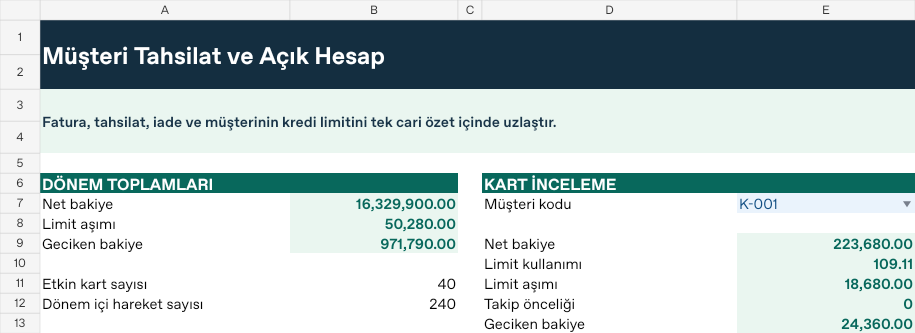
Results from the sample workbook
- Net balance
- 223,680
- Limit excess
- 18,680
- Overdue balance
- 24,360
Who can use it, and for what?
Collections, credit control and B2B trade
Compare open exposure with the assigned limit before offering more credit.
A worked example from the workbook
K-001 has a balance of 223,680 against a 205,000 limit. The excess is 18,680, with 24,360 overdue. Read the two signals separately.
| Measure | Sample result |
|---|---|
| Net balance | 223,680 |
| Limit excess | 18,680 |
| Overdue balance | 24,360 |
How do you start with your own data?
- Set opening debt, credit limit, aging target and risk buffer by customer.
- Log invoices, receipts, offsets and overdue amounts by customer code and date.
- Set the report start, end and scenario on Ayarlar. Both boundary dates are included.
- Review per-record calculations on Analiz and totals and selected cards such as K-001 on Panel. Resolve unmatched codes, missing dates and duplicate records on Kontrol.
Test a different scenario
On Ayarlar, lower B9 from 1 to 0.50. K-001’s balance stays at 223,680 while the follow-up threshold drops to 16,776. The amount prioritised for follow-up rises from zero to 24,360. Keep K-001 selected on Panel and compare the result. Restore the original input when you finish.
Hücre adresleri ve formüller için Türkçe kılavuzu aç