Multi-Warehouse Inventory and Purchasing
Track physical, reserved and inbound stock by warehouse and item, and plan full-case purchases.
Premium workbook preview · Member downloads are not yet available
Results from the sample workbook
- Stock position
- 141.6
- Suggested order
- 168
- Purchase budget
- 33,600
Who can use it, and for what?
Distribution, retail and multi-warehouse purchasing
See which warehouse needs to reorder an item and how much to budget.
A worked example from the workbook
K-001 has 108 physical units. Accounting for inbound and reserved stock gives a position of 141.6. A target gap of 158.4 rounds to 168 units in cases of 24.
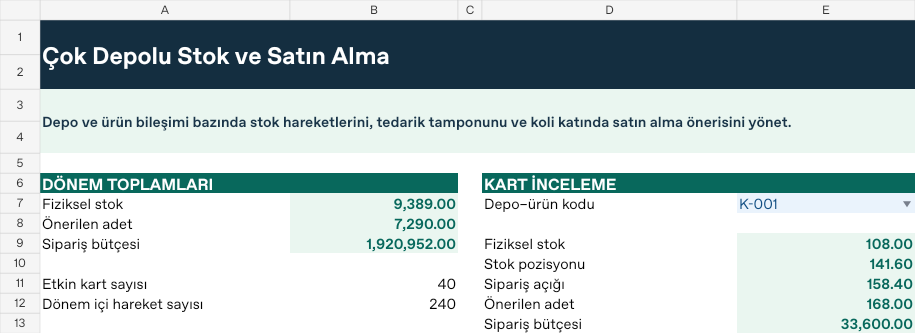
| Measure | Sample result |
|---|---|
| Stock position | 141.6 |
| Suggested order | 168 |
| Purchase budget | 33,600 |
How do you start with your own data?
- Set opening stock, unit cost, buffer and case size on each warehouse–item record.
- Record dated receipts, issues, reservations and inbound units against the same code.
- Set the report start, end and scenario on Ayarlar. Both boundary dates are included.
- Review per-record calculations on Analiz and totals and selected cards such as K-001 on Panel. Resolve unmatched codes, missing dates and duplicate records on Kontrol.
Test a different scenario
On Ayarlar, move B9 from 1.25 to 1.50. K-001 stays at a stock position of 141.60 while the target grows to 360. The workbook should suggest 240 units at a budget of 48,000. Keep K-001 selected on Panel and compare the result. Restore the original input when you finish.
Hücre adresleri ve formüller için Türkçe kılavuzu aç