Supplier Scorecard
Compare suppliers on delivery, quality and price using adjustable weights. Review score and threshold attainment together.
Macro-free .xlsx · 15 sample records · Workbook labels in Turkish
Results from the sample workbook
- Zamanında oranı
- 80%
- Kabul oranı
- 95.33%
- Fiyat oranı
- 80%
Who can use it, and for what?
Procurement and supplier development
See how delivery, quality and price contribute to a low supplier score.
Incoming quality and warehouse teams
Use inspection and delivery records in regular supplier reviews.
A worked example from the workbook
TD-101 delivered 16 of 20 orders on time and had seven defects in 150 inspected items. The weighted score is 85.37%, and the workbook flags it against the threshold. Review the individual scores before discussing improvements.
| Measure | Sample result |
|---|---|
| Zamanında oranı | 80% |
| Kabul oranı | 95.33% |
| Fiyat oranı | 80% |
| Ağırlıklı skor | 85.37% |
| Eşik altı | 1 |
How do you start with your own data?
- Compare suppliers for the same period and scope. On-time deliveries and acceptances cannot exceed their respective totals. Set weights to sum to one hundred percent.
- Make a copy of the sample workbook. Review the settings on Panel and replace the blue inputs on Veri with your own data.
- Compare dashboard totals with the row-level results on Veri. The written guide below shows how to test a change.
Detailed Excel guide
Initial setup
Compare suppliers for the same period and scope. On-time deliveries and acceptances cannot exceed their respective totals. Set weights to sum to one hundred percent.
- Open a copy and try the sample data first. Panel contains settings and totals. Veri contains editable inputs and formulas. Workbook field labels are in Turkish and appear as written in the file.
- Compare the settings and the first data row below with the workbook. Blue cells are inputs. Preserve the working formulas.
- The workbook has 15 populated examples and 98 prepared formula rows. Keep the headers and replace the input values with your own records.
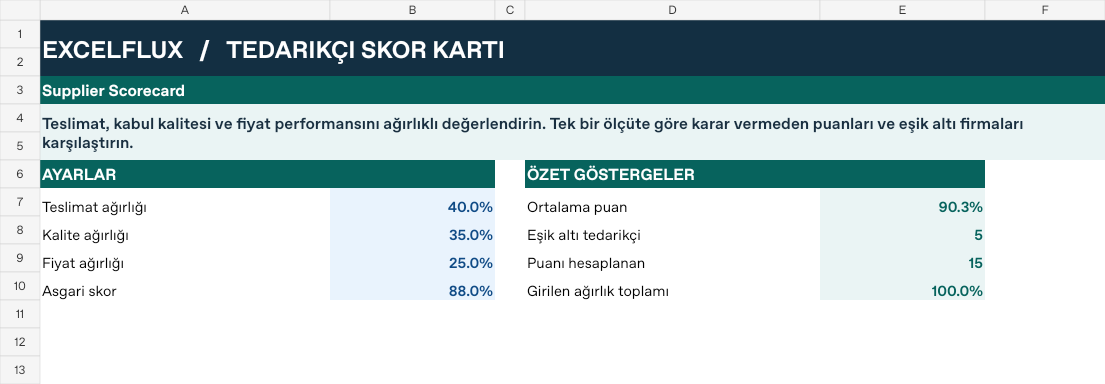
Panel settings
| Cell | Field | Sample value |
|---|---|---|
Panel!B7 | Teslimat ağırlığı | 40% |
Panel!B8 | Kalite ağırlığı | 35% |
Panel!B9 | Fiyat ağırlığı | 25% |
Panel!B10 | Asgari skor | 88% |
First data row
| Cell | Field | Sample value |
|---|---|---|
Veri!A7 | Tedarikçi | TD-101 |
Veri!B7 | Teslimat | 20 |
Veri!C7 | Zamanında | 16 |
Veri!D7 | Kontrol örneği | 150 |
Veri!E7 | Kusurlu | 7 |
Veri!F7 | Referans fiyat | 1,000 |
Veri!G7 | Teklif fiyatı | 1,250 |
Calculated results and formulas
These values are calculated from the supplied workbook examples.
Formulas below use English Excel syntax. Function names and separators can vary with your Excel locale.
| Cell | Field | Sample value |
|---|---|---|
Veri!H7 | Zamanında oranıCell formula=IF(A7="","",IF(B7>0,MIN(1,C7/B7),0)) | 80% |
Veri!I7 | Kabul oranıCell formula=IF(A7="","",IF(D7>0,MAX(0,1-E7/D7),0)) | 95.33% |
Veri!J7 | Fiyat oranıCell formula=IF(A7="","",IF(G7>0,MIN(1,F7/G7),0)) | 80% |
Veri!K7 | Ağırlıklı skorCell formula=IF(A7="","",IF(AND(B7>0,D7>0,G7>0,SUM(Panel!$B$7:$B$9)>0),(H7*Panel!$B$7+I7*Panel!$B$8+J7*Panel!$B$9)/SUM(Panel!$B$7:$B$9),"")) | 85.37% |
Veri!L7 | Eşik altıCell formula=IF(A7="","",IF(ISNUMBER(K7),IF(K7<Panel!$B$10,1,0),0)) | 1 |
Dashboard indicators
These values are calculated from the supplied workbook examples.
| Cell | Field | Sample value |
|---|---|---|
Panel!E7 | Ortalama puan | 90.27% |
Panel!E8 | Eşik altı tedarikçi | 5 |
Panel!E9 | Puanı hesaplanan | 15 |
Panel!E10 | Girilen ağırlık toplamı | 100% |
Change one input and check the result
- Open the Veri sheet in the sample workbook.
C7→ enter 20.L7expected value 0.- Review the affected dashboard metrics. Restore the test input or save the example as a separate copy before using your own data.
Interpretation and troubleshooting
The weighted score and the below-threshold flag are different outputs. Examine weak sub-scores before deciding what to improve. Review suppliers with no observations separately.
If the result does not change, confirm the input cell and sheet and check that automatic calculation is enabled. To reproduce the example, leave the remaining inputs at their starting values.