Procurement Bid Comparison
Compare quotes in different currencies on a common basis. Include freight, exchange-rate stress, customs and local costs.
Macro-free .xlsx · 15 sample records · Workbook labels in Turkish
Results from the sample workbook
- Baz mal ve navlun
- 203,000
- Baz gümrük
- 9,135
- Baz toplam maliyet
- 215,235
Who can use it, and for what?
Import and purchasing teams
Compare offers across currencies with product, freight and customs costs included.
Finance and supply chain
Review the budget exposure and unit cost under a less favourable exchange rate.
A worked example from the workbook
TK-301 costs 215,235 for 500 units in the base case and 236,448.50 under stress. The gap is 21,213.50. Compare the totals and unit costs to assess currency sensitivity.
| Measure | Sample result |
|---|---|
| Baz mal ve navlun | 203,000 |
| Baz gümrük | 9,135 |
| Baz toplam maliyet | 215,235 |
| Stres toplam maliyet | 236,448.5 |
| Stres birim maliyet | 472.9 |
| Kur riski tutarı | 21,213.5 |
How do you start with your own data?
- Compare the same quantity and delivery scope. Keep foreign-currency item cost, exchange rate, freight, duty rate and local fees separate. Avoid converting local charges twice.
- Make a copy of the sample workbook. Review the settings on Panel and replace the blue inputs on Veri with your own data.
- Compare dashboard totals with the row-level results on Veri. The written guide below shows how to test a change.
Detailed Excel guide
Initial setup
Compare the same quantity and delivery scope. Keep foreign-currency item cost, exchange rate, freight, duty rate and local fees separate. Avoid converting local charges twice.
- Open a copy and try the sample data first. Panel contains settings and totals. Veri contains editable inputs and formulas. Workbook field labels are in Turkish and appear as written in the file.
- Compare the settings and the first data row below with the workbook. Blue cells are inputs. Preserve the working formulas.
- The workbook has 15 populated examples and 98 prepared formula rows. Keep the headers and replace the input values with your own records.
Panel settings
| Cell | Field | Sample value |
|---|---|---|
Panel!B7 | Kur stresi | 10% |
First data row
| Cell | Field | Sample value |
|---|---|---|
Veri!A7 | Teklif | TK-301 |
Veri!B7 | Miktar | 500 |
Veri!C7 | Döviz birim fiyat | 11 |
Veri!D7 | Baz kur | 35 |
Veri!E7 | Döviz navlun | 300 |
Veri!F7 | Gümrük oranı | 4.5% |
Veri!G7 | Yerel masraf | 3,100 |
Calculated results and formulas
These values are calculated from the supplied workbook examples.
Formulas below use English Excel syntax. Function names and separators can vary with your Excel locale.
| Cell | Field | Sample value |
|---|---|---|
Veri!H7 | Baz mal ve navlunCell formula=IF(A7="","",(B7*C7+E7)*D7) | 203,000 |
Veri!I7 | Baz gümrükCell formula=IF(A7="","",H7*F7) | 9,135 |
Veri!J7 | Baz toplam maliyetCell formula=IF(A7="","",SUM(H7:I7)+G7) | 215,235 |
Veri!K7 | Stres toplam maliyetCell formula=IF(A7="","",SUM(H7:I7)*(1+Panel!$B$7)+G7) | 236,448.5 |
Veri!L7 | Stres birim maliyetCell formula=IF(A7="","",IF(B7>0,K7/B7,"")) | 472.9 |
Veri!M7 | Kur riski tutarıCell formula=IF(A7="","",K7-J7) | 21,213.5 |
Dashboard indicators
These values are calculated from the supplied workbook examples.
| Cell | Field | Sample value |
|---|---|---|
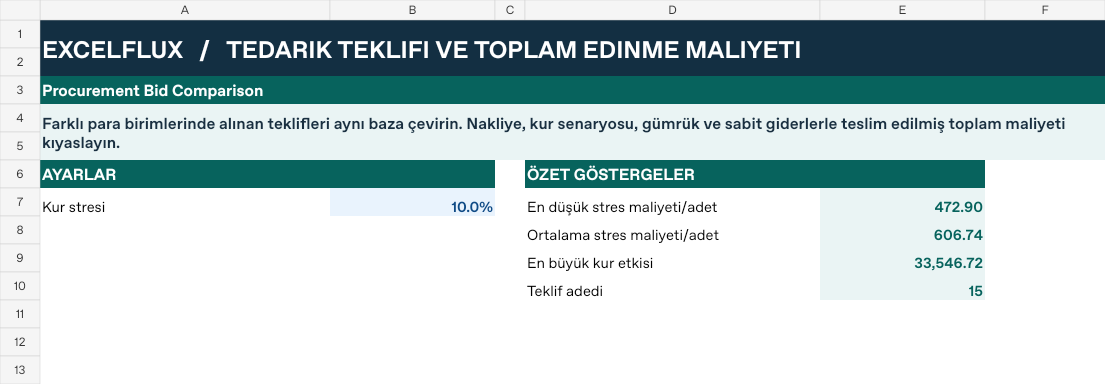
Panel!E7 | En düşük stres maliyeti/adet | 472.9 |
Panel!E8 | Ortalama stres maliyeti/adet | 606.74 |
Panel!E9 | En büyük kur etkisi | 33,546.72 |
Panel!E10 | Teklif adedi | 15 |
Change one input and check the result
- Open the Veri sheet in the sample workbook.
D7→ enter 30.H7expected value 174,000.- Review the affected dashboard metrics. Restore the test input or save the example as a separate copy before using your own data.
Interpretation and troubleshooting
Compare base and stressed landed cost alongside the quoted unit price. Confirm whether freight, insurance and local charges are included before comparing offers.
If the result does not change, confirm the input cell and sheet and check that automatic calculation is enabled. To reproduce the example, leave the remaining inputs at their starting values.