Fixed-Rate Loan Schedule
Adjust principal, nominal annual rate and term. Compare total interest and payoff timing before and after regular extra principal payments.
Macro-free .xlsx · 98 sample records · Workbook labels in Turkish
Results from the sample workbook
- Ekli açılış
- 300,000
- Ekli faiz
- 6,000
- Ekli taksit
- 11,769.86
Who can use it, and for what?
Individuals and businesses preparing budgets
Compare standard and extra-principal schedules for fixed-rate debt month by month.
Finance teams
Inspect the effect of extra principal on closing balances and totals.
A worked example from the workbook
With an opening balance of 300,000, a 2,500 extra principal payment reduces month-one closing principal to 291,730.14. The base schedule closes at 294,230.14. Compare total interest and payoff month across the full schedule.
| Measure | Sample result |
|---|---|
| Ekli açılış | 300,000 |
| Ekli faiz | 6,000 |
| Ekli taksit | 11,769.86 |
| Ek anapara | 2,500 |
| Ekli kapanış | 291,730.14 |
| Baz açılış | 300,000 |
| Baz faiz | 6,000 |
| Baz kapanış | 294,230.14 |
How do you start with your own data?
- In Panel, enter principal, nominal annual rate, term and regular extra payment. The term is one to ninety-eight months. Enter one-off principal payments in the correct month.
- Make a copy of the sample workbook. Review the settings on Panel and replace the blue inputs on Veri with your own data.
- Compare dashboard totals with the row-level results on Veri. The written guide below shows how to test a change.
Detailed Excel guide
Initial setup
In Panel, enter principal, nominal annual rate, term and regular extra payment. The term is one to ninety-eight months. Enter one-off principal payments in the correct month.
- Open a copy and try the sample data first. Panel contains settings and totals. Veri contains editable inputs and formulas. Workbook field labels are in Turkish and appear as written in the file.
- Compare the settings and the first data row below with the workbook. Blue cells are inputs. Preserve the working formulas.
- The workbook has 98 populated examples and 98 prepared formula rows. Keep the headers and replace the input values with your own records.
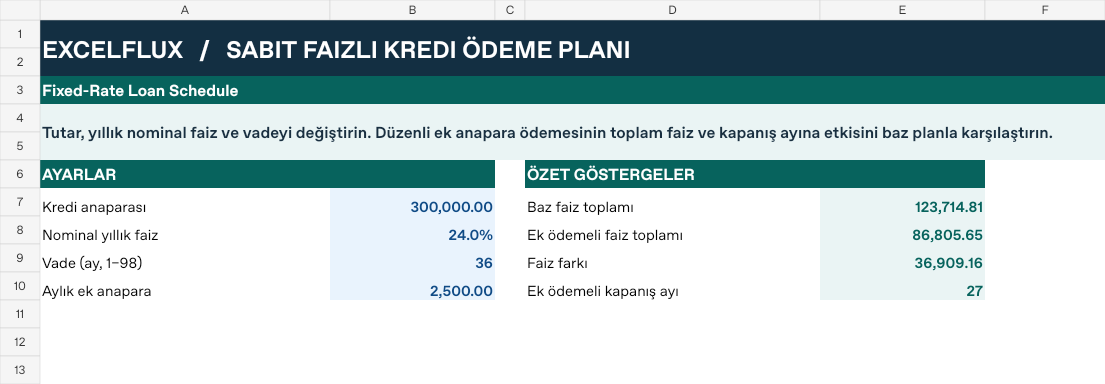
Panel settings
| Cell | Field | Sample value |
|---|---|---|
Panel!B7 | Kredi anaparası | 300,000 |
Panel!B8 | Nominal yıllık faiz | 24% |
Panel!B9 | Vade (ay, 1–98) | 36 |
Panel!B10 | Aylık ek anapara | 2,500 |
First data row
| Cell | Field | Sample value |
|---|---|---|
Veri!A7 | Ay | 1 |
Veri!B7 | Tek seferlik ek ödeme | 0 |
Calculated results and formulas
These values are calculated from the supplied workbook examples.
Formulas below use English Excel syntax. Function names and separators can vary with your Excel locale.
| Cell | Field | Sample value |
|---|---|---|
Veri!C7 | Ekli açılışCell formula=IF(A7="","",IF(A7=1,Panel!$B$7,G6)) | 300,000 |
Veri!D7 | Ekli faizCell formula=IF(A7="","",C7*Panel!$B$8/12) | 6,000 |
Veri!E7 | Ekli taksitCell formula=IF(A7="","",MIN(C7+D7,IF(Panel!$B$8=0,Panel!$B$7/MAX(1,Panel!$B$9),-PMT(Panel!$B$8/12,MAX(1,Panel!$B$9),Panel!$B$7)))) | 11,769.86 |
Veri!F7 | Ek anaparaCell formula=IF(A7="","",MIN(MAX(0,C7+D7-E7),MAX(0,B7+Panel!$B$10))) | 2,500 |
Veri!G7 | Ekli kapanışCell formula=IF(A7="","",IF(C7+D7-E7-F7<0.00001,0,C7+D7-E7-F7)) | 291,730.14 |
Veri!H7 | Baz açılışCell formula=IF(A7="","",IF(A7=1,Panel!$B$7,J6)) | 300,000 |
Veri!I7 | Baz faizCell formula=IF(A7="","",H7*Panel!$B$8/12) | 6,000 |
Veri!J7 | Baz kapanışCell formula=IF(A7="","",MAX(0,IF(H7+I7-IF(Panel!$B$8=0,Panel!$B$7/MAX(1,Panel!$B$9),-PMT(Panel!$B$8/12,MAX(1,Panel!$B$9),Panel!$B$7))<0.00001,0,H7+I7-IF(Panel!$B$8=0,Panel!$B$7/MAX(1,Panel!$B$9),-PMT(Panel!$B$8/12,MAX(1,Panel!$B$9),Panel!$B$7))))) | 294,230.14 |
Dashboard indicators
These values are calculated from the supplied workbook examples.
| Cell | Field | Sample value |
|---|---|---|
Panel!E7 | Baz faiz toplamı | 123,714.81 |
Panel!E8 | Ek ödemeli faiz toplamı | 86,805.65 |
Panel!E9 | Faiz farkı | 36,909.16 |
Panel!E10 | Ek ödemeli kapanış ayı | 27 |
Change one input and check the result
- Open the Veri sheet in the sample workbook.
B7→ enter 5,000.F7expected value 7,500.- Review the affected dashboard metrics. Restore the test input or save the example as a separate copy before using your own data.
Interpretation and troubleshooting
Compare payoff month and total interest under the base and extra-payment plans. Extra principal is capped by remaining balance. Reconcile fees, penalties and contract-specific payment dates separately.
If the result does not change, confirm the input cell and sheet and check that automatic calculation is enabled. To reproduce the example, leave the remaining inputs at their starting values.