13-Week Cash Flow
See how much cash you could have on hand over the next 13 weeks. If collections fall short, find the first week your cash buffer comes under pressure and see how large the gap could be.
Macro-free .xlsx · 13 weeks of sample data · Workbook labels in Turkish
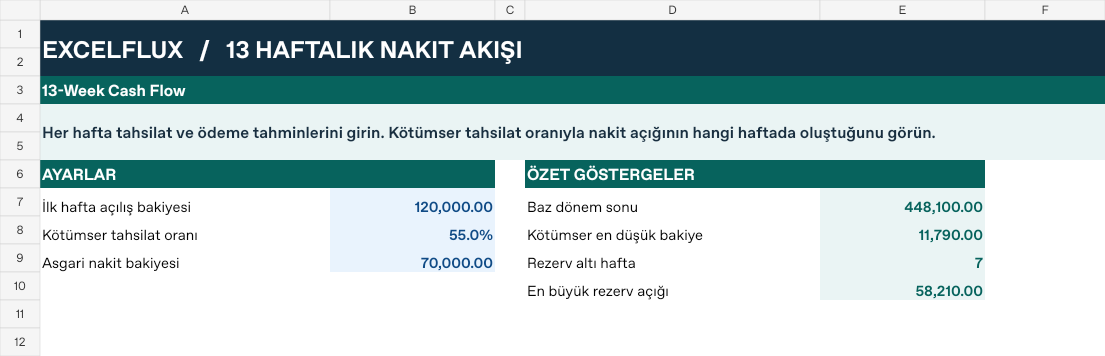
Results from the sample workbook
- Below the cash buffer
- 7 weeks
- Lowest downside cash balance
- 11,790
- Largest cash buffer gap
- 58,210
Who can use it, and for what?
Business owners and finance leads
Track available cash by week. See when payroll, rent and supplier payments are due at the same time.
Wholesale and distribution
Compare customer collections on credit with supplier due dates. See which week a large inventory purchase could strain cash.
Manufacturing, project and service teams
Compare material, contractor or payroll costs with customer deposits and milestone payments. Decide which spending to prioritise if a receipt is delayed.
Example with 55% of expected collections received
The business starts with 120,000 in cash and wants to keep at least 70,000 available. The base case assumes all expected collections arrive. The downside case assumes 55% arrive. Confirmed receipts and payments are the same in both scenarios.
| Week | Base balance | Downside balance | Buffer gap |
|---|---|---|---|
| 1 | 96,500 | 71,750 | 0 |
| 2 | 124,200 | 73,890 | 0 |
| 3 | 139,100 | 62,420 | 7,580 |
| 9 | 263,700 | 11,790 | 58,210 |
The first gap appears in week 3. Cash closes at 62,420, which is 7,580 below the target. In week 9 the gap reaches 58,210. Seeing those weeks in advance gives you time to confirm a customer payment date or discuss the payment schedule with a supplier.
How do you start with your own data?
Gather your weekly collections list, payment schedule and current opening cash balance. Enter all amounts in the same currency.
Set the opening balance and cash buffer
On the Panel sheet, enter the first week’s opening cash and the minimum you want to keep available. Set the share of expected collections you expect to receive under the downside scenario.
Place receipts and payments in the right weeks
Replace the sample entries on the Veri sheet with your amounts. Keep confirmed receipts separate from expected collections. Put payroll, supplier and other payments in the week the cash will leave.
Find the first shortfall and refresh the plan
Check the downside balance and buffer gap columns on the Veri sheet. Work out which receipt you could bring forward or which payment you could reschedule before the first gap. Refresh the plan weekly with actual amounts.
Detailed Excel guide
Initial setup
Use the same weekly cutoff throughout. Separate confirmed receipts from expected collections so the same payment is counted once. Reconcile opening cash to the bank before rolling forward.
- Open a copy and try the sample data first. Panel contains settings and totals. Veri contains editable inputs and formulas. Workbook field labels are in Turkish and appear as written in the file.
- Compare the settings and the first data row below with the workbook. Blue cells are inputs. Preserve the working formulas.
- The workbook has 13 populated examples and 13 prepared formula rows. Keep the headers and replace the input values with your own records.
Panel settings
| Cell | Field | Sample value |
|---|---|---|
Panel!B7 | İlk hafta açılış bakiyesi | 120,000 |
Panel!B8 | Kötümser tahsilat oranı | 55% |
Panel!B9 | Asgari nakit bakiyesi | 70,000 |
First data row
| Cell | Field | Sample value |
|---|---|---|
Veri!A7 | Hafta | Hafta 01 |
Veri!B7 | Kesin giriş | 38,000 |
Veri!C7 | Beklenen tahsilat | 55,000 |
Veri!D7 | Maaş | 82,000 |
Veri!E7 | Tedarikçi | 27,000 |
Veri!F7 | Diğer çıkış | 7,500 |
Calculated results and formulas
These values are calculated from the supplied workbook examples.
Formulas below use English Excel syntax. Function names and separators can vary with your Excel locale.
| Cell | Field | Sample value |
|---|---|---|
Veri!G7 | Baz net akışCell formula=IF(A7="","",B7+C7-SUM(D7:F7)) | -23,500 |
Veri!H7 | Baz kapanışCell formula=IF(A7="","",IF(ROW()=7,Panel!$B$7,H6)+G7) | 96,500 |
Veri!I7 | Kötümser netCell formula=IF(A7="","",B7+C7*Panel!$B$8-SUM(D7:F7)) | -48,250 |
Veri!J7 | Kötümser kapanışCell formula=IF(A7="","",IF(ROW()=7,Panel!$B$7,J6)+I7) | 71,750 |
Veri!K7 | Rezerv açığıCell formula=IF(A7="","",MAX(0,Panel!$B$9-J7)) | 0 |
Dashboard indicators
These values are calculated from the supplied workbook examples.
| Cell | Field | Sample value |
|---|---|---|
Panel!E7 | Baz dönem sonu | 448,100 |
Panel!E8 | Kötümser en düşük bakiye | 11,790 |
Panel!E9 | Rezerv altı hafta | 7 |
Panel!E10 | En büyük rezerv açığı | 58,210 |
Change one input and check the result
- Open the Veri sheet in the sample workbook.
C7→ enter 65,000.J7expected value 77,250.- Review the affected dashboard metrics. Restore the test input or save the example as a separate copy before using your own data.
Interpretation and troubleshooting
Compare base and downside closing balances and identify the first week with a reserve shortfall. Negative weekly net cash does not automatically mean the reserve has been breached.
If the result does not change, confirm the input cell and sheet and check that automatic calculation is enabled. To reproduce the example, leave the remaining inputs at their starting values.