Receivables Aging and Collections
Classify invoices and partial receipts by due date. Review outstanding balances, overdue days and follow-up exposure.
Macro-free .xlsx · 18 sample records · Workbook labels in Turkish
Results from the sample workbook
- Açık bakiye
- 17,000
- Gecikme günü
- 55
- Açık · vadesi gelmemiş
- 0
Who can use it, and for what?
Receivables and collections teams
Build the weekly follow-up list from balances grouped by days overdue.
Businesses selling on credit
Discuss the balance outstanding after partial payment with each customer.
A worked example from the workbook
Invoice F-1001 was for 22,000, of which 5,000 has been collected. The remaining 17,000 is 55 days overdue, so it falls in the 31–60 day group and is flagged for follow-up.
| Measure | Sample result |
|---|---|
| Açık bakiye | 17,000 |
| Gecikme günü | 55 |
| Açık · vadesi gelmemiş | 0 |
| Açık · 1–30 gün | 0 |
| Açık · 31–60 gün | 17,000 |
| Açık · 60+ gün | 0 |
| Öncelikli takip | 17,000 |
How do you start with your own data?
- Use one row per invoice and match payments by invoice number. Choose an as-of date and include only cash received by that date.
- Make a copy of the sample workbook. Review the settings on Panel and replace the blue inputs on Veri with your own data.
- Compare dashboard totals with the row-level results on Veri. The written guide below shows how to test a change.
Detailed Excel guide
Initial setup
Use one row per invoice and match payments by invoice number. Choose an as-of date and include only cash received by that date.
- Open a copy and try the sample data first. Panel contains settings and totals. Veri contains editable inputs and formulas. Workbook field labels are in Turkish and appear as written in the file.
- Compare the settings and the first data row below with the workbook. Blue cells are inputs. Preserve the working formulas.
- The workbook has 18 populated examples and 98 prepared formula rows. Keep the headers and replace the input values with your own records.
Panel settings
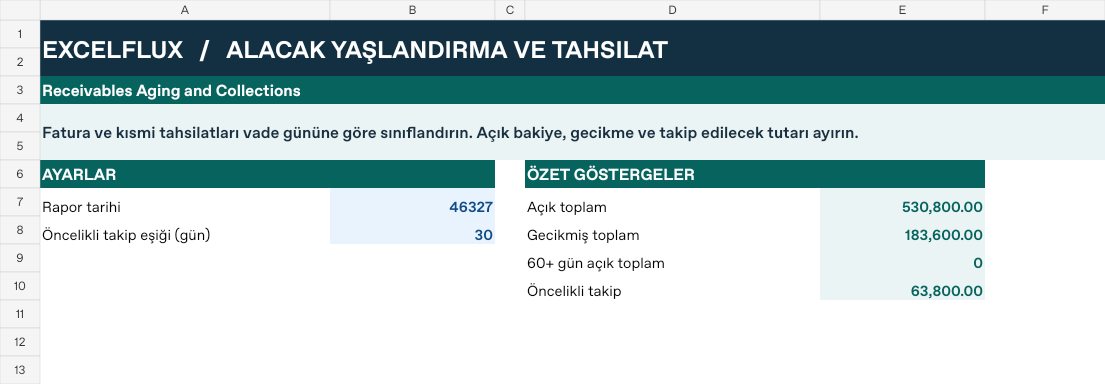
| Cell | Field | Sample value |
|---|---|---|
Panel!B7 | Rapor tarihi | 2026-11-01 |
Panel!B8 | Öncelikli takip eşiği (gün) | 30 |
First data row
| Cell | Field | Sample value |
|---|---|---|
Veri!A7 | Fatura | F-1001 |
Veri!B7 | Müşteri | Ada |
Veri!C7 | Vade | 2026-09-07 |
Veri!D7 | Fatura tutarı | 22,000 |
Veri!E7 | Tahsil edilen | 5,000 |
Calculated results and formulas
These values are calculated from the supplied workbook examples.
Formulas below use English Excel syntax. Function names and separators can vary with your Excel locale.
| Cell | Field | Sample value |
|---|---|---|
Veri!F7 | Açık bakiyeCell formula=IF(A7="","",MAX(0,D7-E7)) | 17,000 |
Veri!G7 | Gecikme günüCell formula=IF(A7="","",IF(F7=0,0,MAX(0,Panel!$B$7-C7))) | 55 |
Veri!H7 | Açık · vadesi gelmemişCell formula=IF(A7="","",IF(G7=0,F7,0)) | 0 |
Veri!I7 | Açık · 1–30 günCell formula=IF(A7="","",IF(AND(G7>0,G7<=30),F7,0)) | 0 |
Veri!J7 | Açık · 31–60 günCell formula=IF(A7="","",IF(AND(G7>30,G7<=60),F7,0)) | 17,000 |
Veri!K7 | Açık · 60+ günCell formula=IF(A7="","",IF(G7>60,F7,0)) | 0 |
Veri!L7 | Öncelikli takipCell formula=IF(A7="","",IF(G7>Panel!$B$8,F7,0)) | 17,000 |
Dashboard indicators
These values are calculated from the supplied workbook examples.
| Cell | Field | Sample value |
|---|---|---|
Panel!E7 | Açık toplam | 530,800 |
Panel!E8 | Gecikmiş toplam | 183,600 |
Panel!E9 | 60+ gün açık toplam | 0 |
Panel!E10 | Öncelikli takip | 63,800 |
Change one input and check the result
- Open the Veri sheet in the sample workbook.
E7→ enter 22,000.G7expected value 0.- Review the affected dashboard metrics. Restore the test input or save the example as a separate copy before using your own data.
Interpretation and troubleshooting
Read days overdue alongside the open amount. Prioritized collections are a subset of receivables. Counting future payments understates overdue exposure.
If the result does not change, confirm the input cell and sheet and check that automatic calculation is enabled. To reproduce the example, leave the remaining inputs at their starting values.