Subscription Revenue and Churn
Reconcile opening recurring revenue with new, expansion, contraction and churn movements. Measure monthly net and gross revenue retention.
Macro-free .xlsx · 12 sample records · Workbook labels in Turkish
Results from the sample workbook
- Açılış MRR
- 250,000
- Kapanış MRR
- 263,000
- Net gelir tutma
- 98%
Who can use it, and for what?
SaaS and subscription teams
See whether growth in monthly recurring revenue (MRR) comes from new or existing customers.
Customer success and finance
Review how downgrades and cancellations affect the existing revenue base.
A worked example from the workbook
In January total MRR grows from 250,000 to 263,000, while net retention for existing customers is 98%. The example shows how the total can rise while revenue from the opening customer base falls.
| Measure | Sample result |
|---|---|
| Açılış MRR | 250,000 |
| Kapanış MRR | 263,000 |
| Net gelir tutma | 98% |
| Brüt gelir tutma | 94.8% |
| Kapanış müşteri | 261 |
| NRR hedef altı | 1 |
How do you start with your own data?
- Reconcile first-month opening MRR and customer count to the previous closing report. Split movements into new subscriptions, expansion, contraction and churn.
- Make a copy of the sample workbook. Review the settings on Panel and replace the blue inputs on Veri with your own data.
- Compare dashboard totals with the row-level results on Veri. The written guide below shows how to test a change.
Detailed Excel guide
Initial setup
Reconcile first-month opening MRR and customer count to the previous closing report. Split movements into new subscriptions, expansion, contraction and churn.
- Open a copy and try the sample data first. Panel contains settings and totals. Veri contains editable inputs and formulas. Workbook field labels are in Turkish and appear as written in the file.
- Compare the settings and the first data row below with the workbook. Blue cells are inputs. Preserve the working formulas.
- The workbook has 12 populated examples and 12 prepared formula rows. Keep the headers and replace the input values with your own records.
Panel settings
| Cell | Field | Sample value |
|---|---|---|
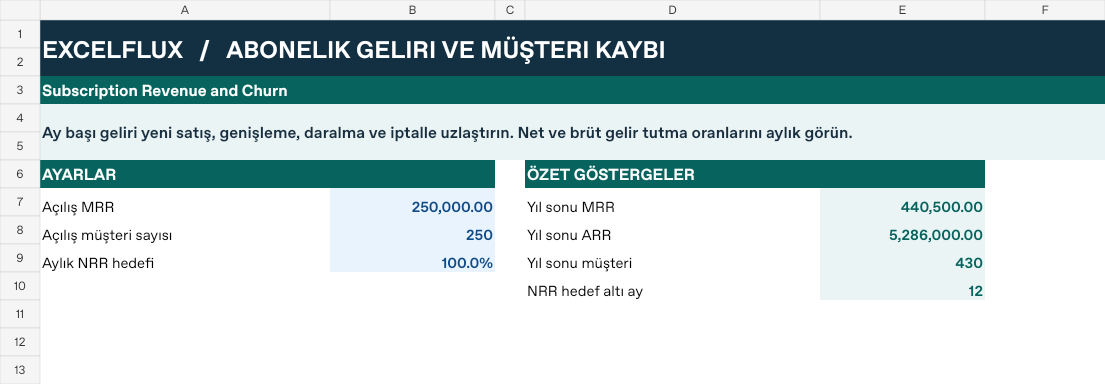
Panel!B7 | Açılış MRR | 250,000 |
Panel!B8 | Açılış müşteri sayısı | 250 |
Panel!B9 | Aylık NRR hedefi | 100% |
First data row
| Cell | Field | Sample value |
|---|---|---|
Veri!A7 | Ay | 2026 / 1 |
Veri!B7 | Yeni MRR | 18,000 |
Veri!C7 | Genişleme | 8,000 |
Veri!D7 | Daralma | 4,500 |
Veri!E7 | İptal MRR | 8,500 |
Veri!F7 | Yeni müşteri | 18 |
Veri!G7 | Kaybedilen müşteri | 7 |
Calculated results and formulas
These values are calculated from the supplied workbook examples.
Formulas below use English Excel syntax. Function names and separators can vary with your Excel locale.
| Cell | Field | Sample value |
|---|---|---|
Veri!H7 | Açılış MRRCell formula=IF(A7="","",IF(ROW()=7,Panel!$B$7,I6)) | 250,000 |
Veri!I7 | Kapanış MRRCell formula=IF(A7="","",H7+B7+C7-D7-E7) | 263,000 |
Veri!J7 | Net gelir tutmaCell formula=IF(A7="","",IF(H7>0,(H7+C7-D7-E7)/H7,"")) | 98% |
Veri!K7 | Brüt gelir tutmaCell formula=IF(A7="","",IF(H7>0,(H7-D7-E7)/H7,"")) | 94.8% |
Veri!L7 | Kapanış müşteriCell formula=IF(A7="","",IF(ROW()=7,Panel!$B$8,L6)+F7-G7) | 261 |
Veri!M7 | NRR hedef altıCell formula=IF(A7="","",IF(ISNUMBER(J7),IF(J7<Panel!$B$9,1,0),0)) | 1 |
Dashboard indicators
These values are calculated from the supplied workbook examples.
| Cell | Field | Sample value |
|---|---|---|
Panel!E7 | Yıl sonu MRR | 440,500 |
Panel!E8 | Yıl sonu ARR | 5,286,000 |
Panel!E9 | Yıl sonu müşteri | 430 |
Panel!E10 | NRR hedef altı ay | 12 |
Change one input and check the result
- Open the Veri sheet in the sample workbook.
E7→ enter 2,000.J7expected value 100.6%.- Review the affected dashboard metrics. Restore the test input or save the example as a separate copy before using your own data.
Interpretation and troubleshooting
Net retention includes expansion from existing customers. Gross retention excludes expansion. New customer revenue is excluded from both. Do not compare a retention ratio with zero opening MRR.
If the result does not change, confirm the input cell and sheet and check that automatic calculation is enabled. To reproduce the example, leave the remaining inputs at their starting values.