Service Desk SLA and Capacity
Review backlog, service-level (SLA) compliance and extra capacity by service team.
Premium workbook preview · Member downloads are not yet available
Results from the sample workbook
- SLA compliance
- 87.5%
- Target gap (points)
- 4.5
- Extra capacity (hours)
- 3.2
Who can use it, and for what?
IT service desks and customer support
Use backlog and service levels together to decide where teams need additional support.
A worked example from the workbook
K-001 reaches 87.5% SLA compliance against a 92% target. The difference is 4.5 percentage points and the model shows 3.2 hours of extra capacity needed.
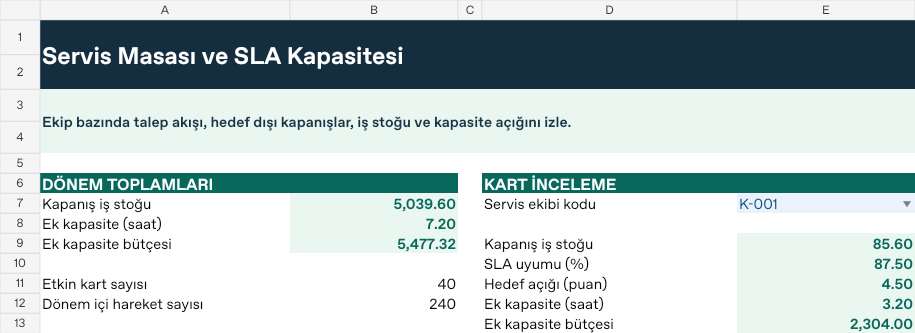
| Measure | Sample result |
|---|---|
| SLA compliance | 87.5% |
| Target gap (points) | 4.5 |
| Extra capacity (hours) | 3.2 |
How do you start with your own data?
- Set opening backlog, normal capacity, SLA target and outsourced hourly cost.
- Record new, closed and late-closed requests and hours used by date.
- Set the report start, end and scenario on Ayarlar. Both boundary dates are included.
- Review per-record calculations on Analiz and totals and selected cards such as K-001 on Panel. Resolve unmatched codes, missing dates and duplicate records on Kontrol.
Test a different scenario
Raise the workload multiplier in Ayarlar B9 from 1.20 to 1.40. K-001’s SLA stays at 87.50%, while overtime capacity rises from 3.20 to 28.40 hours, costing 20,448. Keep K-001 selected on Panel and compare the result. Restore the original input when you finish.
Hücre adresleri ve formüller için Türkçe kılavuzu aç